Telstra’s “Apple Watch for Your Kids” allows iPhone users to set up an Apple Watch for their child using an eSIM, as an add-on to their existing Telstra mobile plan.
While it locks you into the Apple product for the watch and Telstra for mobile access, the set-up process is as smooth and easy as you would expect from an iPhone/Apple Watch combination.
Hopefully another telco will provide some extra competition for this type of service, as the Telstra/Apple plan will be at least $90 per month. Overall, this is a solid offering, but the fact that you’re locked into Telstra as your only option makes this plan less appealing.
Price: Extra $20 per month on top of almost any Telstra mobile plan. Plus, you must already own at least an iPhone 11 running iOS 14 (or any newer iPhone and operating system) and an Apple Watch SE running watchOS 7 (or any newer Apple Watch and operating system).
If you want to provide your child with a bit of online freedom while ensuring their safety and security, you might be considering a smart watch with its own eSIM. This can be a good way to keep in touch with them without providing them with a full-blown smartphone.
But if you simply hand your child a standard smartwatch with an eSIM and their own mobile plan, they will have a level of freedom that you may not be ready to give to a young child, including the option to access online apps and send and receive calls or texts from anyone.
Telstra’s Apple Watch For Your Kids plan offers a solution to this parental quandary.
It’s a mobile plan add-on that allows you to access all the communication and safety features of an Apple Watch for your young family member without the need to also provide them with an iPhone or have a separate mobile plan.
You can use all the health and fitness features available on any Apple Watch, or limit the apps to a selection of your choosing
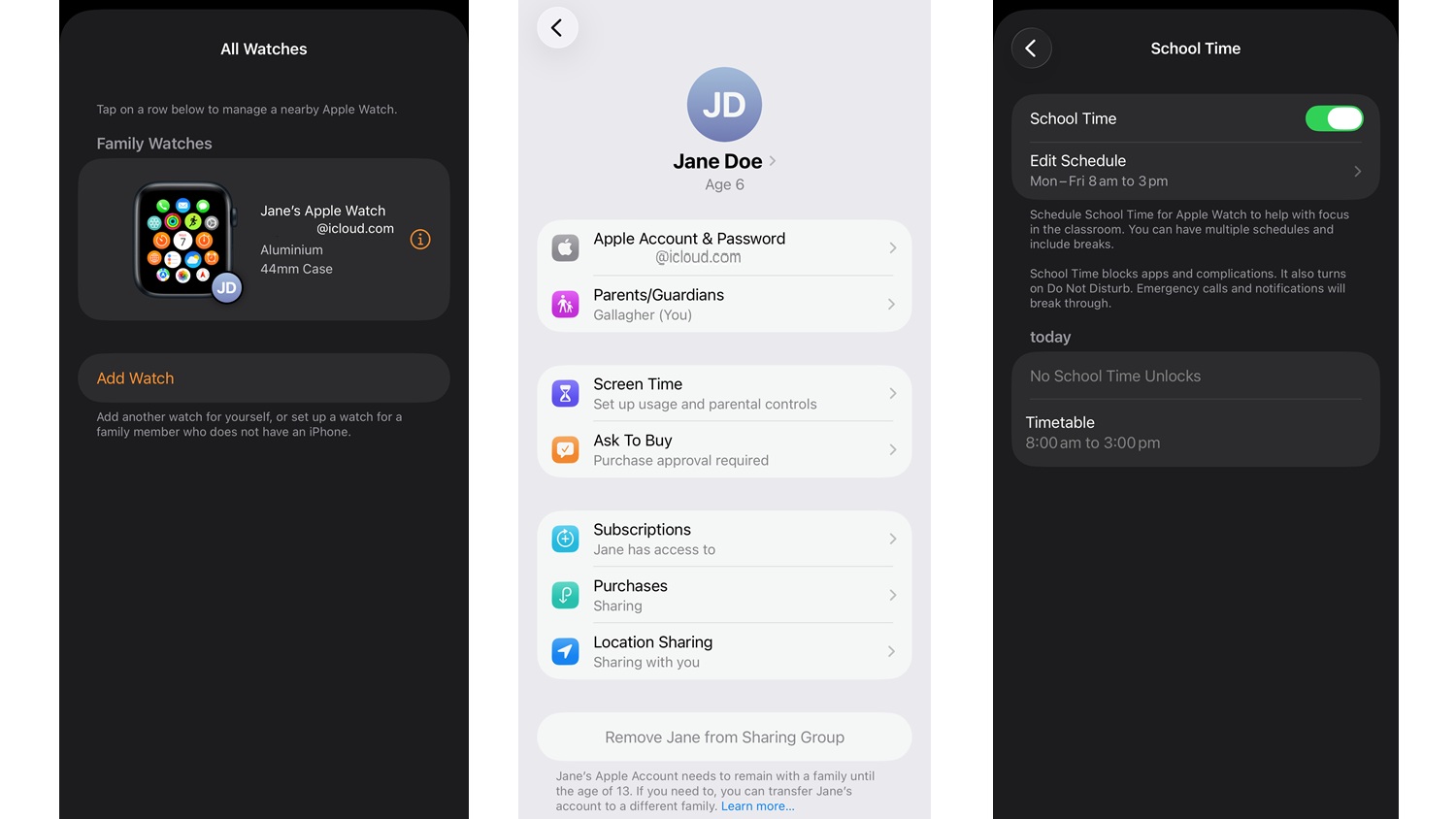
It works by allowing parents with an iPhone to add an eSIM onto their existing mobile plan which is then installed into the watch so that the child can text, call and share their location and use the fitness features and apps of an Apple Watch.
The child can use all the health and fitness features available on any Apple Watch, or the parent can limit the apps to a selection of their choosing and they also have control over the child’s contacts list.
The parental controls allow you to restrict who your child can call or message (and at what times), flick the watch into schooltime mode (no app access and no ability to send or receive texts or calls), block explicit media, prevent app downloads and purchases and restrict web browsing; and track your child’s location.
The child’s watch can be managed through the parent’s iPhone.
What do you need to set up the watch?
To get started, you need to own an iPhone and Apple Watch with the ability to accommodate an eSIM. Thankfully you don’t need to buy a particularly new iPhone or Apple Watch and in fact you may have everything you need at home already. You need an iPhone 11 or newer (running at least iOS 14) and an Apple Watch Series 7 or later with cellular capability (eSIM).
Importantly, you don’t need to provide a separate mobile plan for your child, as it is added onto your existing Telstra plan. If you’re not with Telstra already, you’ll need to switch to access this plan.
You need to own an iPhone and Apple Watch with an eSIM
Make sure you have the iPhone you will be using to administer the watch, the watch you will be using and your child with you during setup and if you are using one of your old watches make sure you have a smaller watchband ready for them to put on.
How does it work?
During the set-up stage, you’ll quickly realise this isn’t just an Apple product, it’s an Apple/Telstra product – your iPhone will direct you to your Telstra account to finish the plan upgrade to include the Apple Watch For Kids mobile number. There is no denying that there are other mobile networks with more affordable basic mobile phone plan offerings but Apple Watch For Kids is likely to remain a Telstra exclusive.
The Apple Watch For Kids will have its own mobile number and is set up through the parent’s iPhone, so … the level of freedom is determined by the parent on the iPhone
The Apple Watch For Kids will have its own mobile number and is set up through the parent’s iPhone, so kids can connect with family and friends through phone calls and messages and the level of freedom is determined by the parent on the iPhone.
A separate ID is required for the watch holder so you do need to establish an Apple ID for your child and if you like they can make up their own profile and password (or you can give them the password to use).
Kids can make and take phone and FaceTime audio calls, as well as send and receive messages and emails. The Memoji app on Apple Watch allows kids to customise a Memoji that can be shared while messaging friends or displayed as a watch face. Parents have the ability to approve all contacts, so kids can safely use the communication features of the Apple Watch.
Undoubtedly this will lead to dinner conversations on who your child can and can’t talk to, which could also be a good way to know more about their social interactions without getting too intrusive.
Having their own Apple ID also allows the child to develop skills in scheduling using the calendar app. In addition, parents will have peace of mind knowing they can reach their child and identify their location, and that all personal data stays securely encrypted.
Kids can play their favourite songs on Apple Music through Bluetooth headphones and speakers, and ask Siri for answers to questions or language translations. With Maps, the child can learn to navigate safely and independently, whether heading to another family member’s house or to a park with friends.
The child’s location can be shared with their guardian (parent) through the Find People app on Apple Watch, and location notifications are customisable, allowing the parent to receive an update on their child’s location.
Kid-friendly fitness features
Some of the layout and wording used on the watch have been adjusted to be more appropriate for kids. For example, while the standard Apple watch highlights the number of calories burned, the kids version tracks the number of minutes spent moving.
Outdoor walk, outdoor run, and outdoor cycle workouts have been specifically calibrated for kids, while coaching notifications are tailored to your child’s relevant reading level and made more fun with emojis.
Kids can also send and receive their activity data, challenge other kids with activity competitions, and check out an awards page for milestones.
In a word, no. This is an Apple all-in solution and even having an Apple/Android mix in the family (one parent on an iPhone one on an Android smartphone) would make this solution problematic and introduce a level of confusion in monitoring unless one of the parents is OK with being out of the loop.
Wearing watches at school
Because the focus is on children, the Apple Watch For Your Kids setup allows your child to wear the watch while accommodating tech bans during school hours. A School Time mode shows a distinctive yellow circle on the watch face so teachers and parents can easily recognise that access to apps has been restricted and a “Do Not Disturb” setting is turned on.
While this function is aimed at making the watch appropriate for wearing during school hours, parents can set the schedule on their iPhone for any period where it’s important for the child to concentrate on a task at hand or enjoy some screen-free downtime. This setting can also be switched on and off on the control centre on the watch itself.
Know the products to avoid before you shop. Get our free guide and buy smarter.
Denis Gallagher is a Senior project officer for Digital home products and also works on test projects for the laundry and fridge labs. He produces tests for gadgets, phones, cameras and home entertainment gear as well as TVs, washing machines, dishwashers and fridges.
Previously at CHOICE, Denis worked as a Content producer for digital products. Prior to CHOICE, Denis worked as an Assistant editor on Golf Australia magazine and Editor for Multimedia and Videocamera magazine.
Denis has a Bachelor of Arts from the University of New South Wales and a Diploma of Journalism from Macleay College.
Denis Gallagher is a Senior project officer for Digital home products and also works on test projects for the laundry and fridge labs. He produces tests for gadgets, phones, cameras and home entertainment gear as well as TVs, washing machines, dishwashers and fridges.
Previously at CHOICE, Denis worked as a Content producer for digital products. Prior to CHOICE, Denis worked as an Assistant editor on Golf Australia magazine and Editor for Multimedia and Videocamera magazine.
Denis has a Bachelor of Arts from the University of New South Wales and a Diploma of Journalism from Macleay College.
For more than 60 years, CHOICE has been fighting the good fight for Australian consumers.
In the past year alone we've uncovered systemic issues with sunscreens, investigated shonky supermarket pricing, fought for stronger scam protections and helped make complex energy pricing fairer and clearer.
CHOICE is here to provide unbiased advice and independent testing in our world-class labs. We buy the products we test, just like you do, and our expert reviews are influence free. We’re here to help you choose smarter. Hopefully you’ll also save some money along the way.
Thanks to CHOICE, you’ll never be alone when a business treats you unfairly. You can support our work by joining or donating to our cause.