CHOICE has been testing TVs for almost 50 years, and in that time we’ve learned a lot about what matters (and what’s just marketing speak). So what should you look for when buying a TV? And what are the common mistakes to avoid?
The word ‘smart’ is getting a lot of use with TVs these days and it’s constantly changing. It used to refer to whether the TV can connect to the internet and home networks, like your computer or smartphone, but ‘smartness’ continues to evolve as TVs become more sophisticated in the apps they provide and the connectivity they have with other smart devices in your home.
If smart functionality is important to you, go for a smart TV from a top-tier brand, such as LG, Sony or Samsung, as the smarts in cheaper TVs tend to be poorly implemented. The most important thing is to make sure the TV has the smart functionality you need.
A connected smart TV can stream media from Netflix, Disney+ and other subscription services over your home network. You can also catch up on broadcast TV whenever you like using apps like ABC iView or SBS On Demand. These apps can be installed on smart TVs so you don’t need to use an additional device (like an Apple TV or a games console).
Many offer casting or Wi-Fi Direct, where the device makes a one-to-one network connection with your smartphone. This can even extend to smart device support so you can control other devices like speakers, lights and home security cameras. Smart TVs can also easily apply security and system updates to improve the TV’s features and performance.
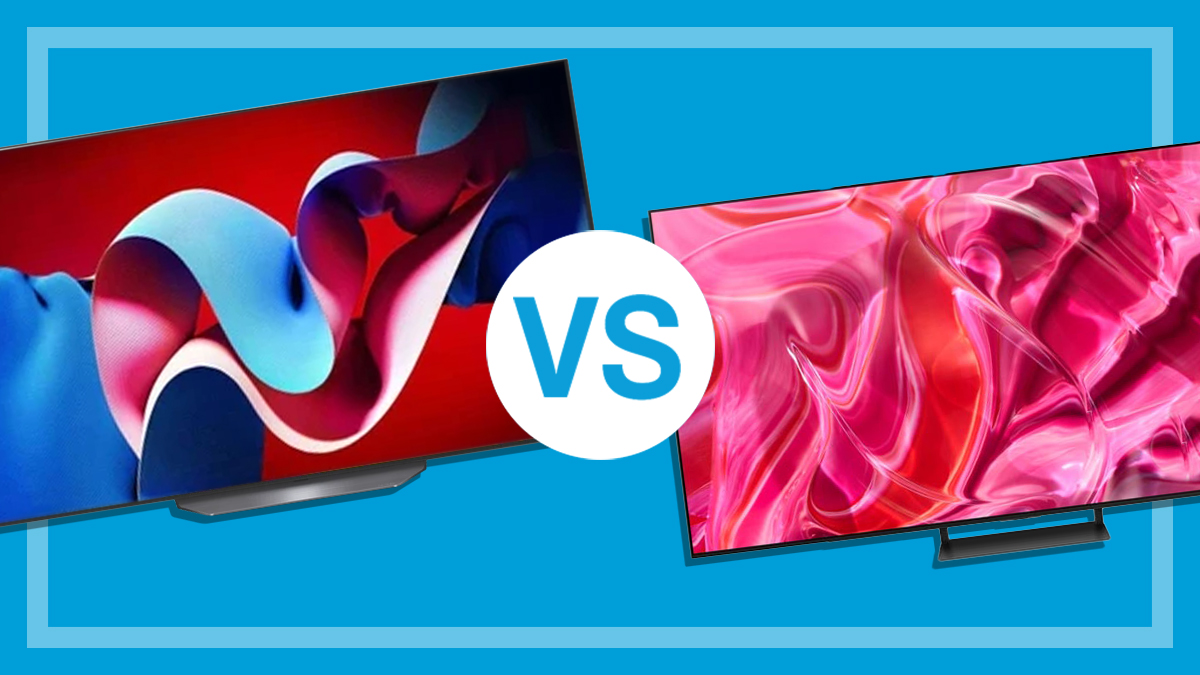
LCD vs OLED screens – which is better?
Walk into a home electronics store and you’ll be bombarded with a cornucopia of letters that determine the TV screen type.
If the TV is well made, the LCD or OLED credentials will make very little difference to the quality of the image. There are differences but for the most part they’re a good deal less important than the quality of the manufacturer.
LCD TVs
An LCD (liquid-crystal display) screen needs a light source behind it, which will either be CCFL (cold cathode fluorescent lamp) or LED (light-emitting diode) technology. CCFL technology has been replaced by LEDs. LED-lit TVs are cheaper to run because the lights have a relatively lower power usage. Some manufacturers and retailers will have you believe that LED is a completely different technology to LCD, but it’s just a marketing ploy. LED is the light to illuminate the picture information displayed on the LCD.
Compared to OLED, LCD TVs are typically brighter. However, colours don’t tend to be quite as rich or vibrant, and dark scenes can look a little grey.
QLED TVs
This is a hybrid system of sorts that combines elements of LCD and LED panels to replicate the contrast and vibrant look of an OLED while retaining the brightness of an LCD. While it works to some degree, this jack-of-all-trades design means it can’t achieve true blacks like an OLED, but you can get a brighter picture than an OLED.
When you see the term resolution when looking to buy a TV, what does it mean and why should you care?
A TV’s resolution is defined by the number of picture elements or pixels on the screen with a figure to show how many pixels are across the screen and from top to bottom. So 1920 x 1080 is an indication of resolution for a TV where there are 1920 horizontal pixels and 1080 vertical pixels. Basically, the higher the resolution, the less likely it is you’ll see dots on the screen when watching a movie.
SD or standard definition resolution is what you would have watched in the ’90s up until the early 2000s when HD (high definition) started to appear. These days 4K is more or less the standard for TVs and you’ll be hard-pressed to find a brand new HD unit.
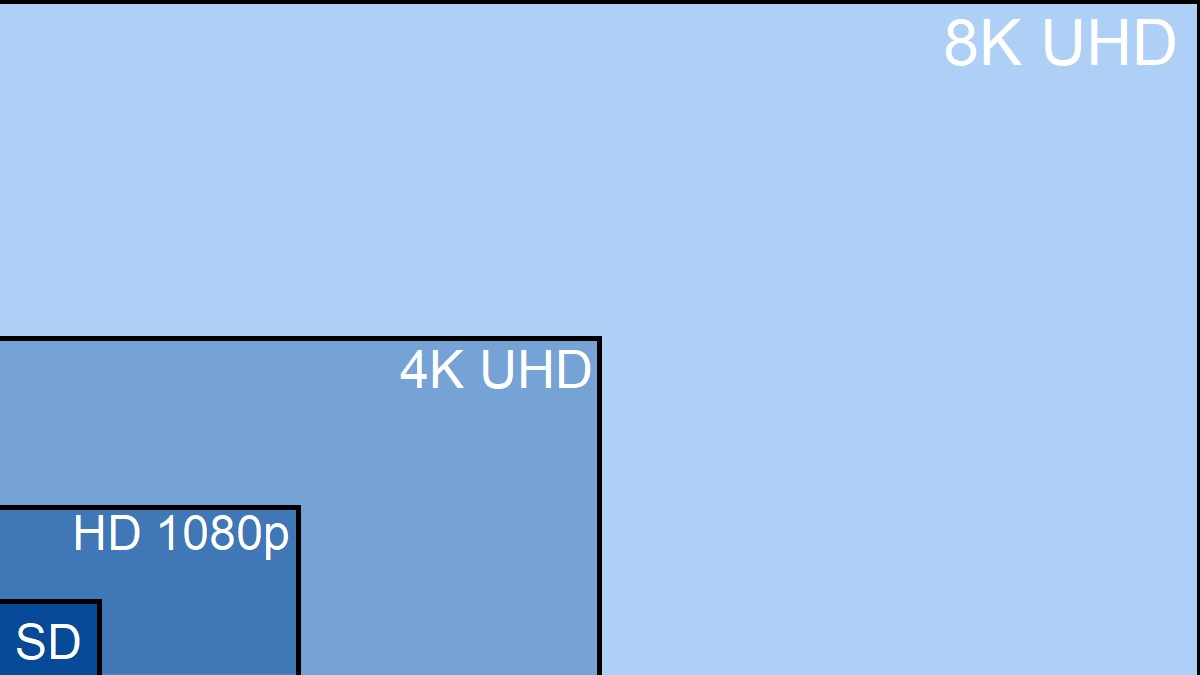
TV resolutions compared. 8K isn’t very common in the consumer space.
4K TVs have a resolution of 3840 x 2160 or four times the resolution of a full HD television. Retailers also call this ultra-high definition or UHD for short but as far as you should be concerned, it’s the same thing. The full benefits of 4K are harder to see on TVs smaller than 55 inches.
There’s plenty of 4K content available on streaming services, though some (like Netflix) require the highest tier subscription. You can also find plenty of 4K movies and shows on good old physical media (provided you have a 4K Blu-ray player), as well as 4K games. The latest models from Xbox and PlayStation, as well as some older generations, support 4K as well as mid to high-end PCs.
Bear in mind that paying for more pixels doesn’t guarantee a better picture. More pixels may actually make it harder for the TV’s picture processor to deliver a good image. Colour accuracy, smooth transitions between colours, and blacks that don’t look muddy or lose detail are still far more important.
TV screen size guide
Personal preference aside, there are three important factors you need to consider for the best viewing experience:
TV screen resolution (HD or 4K)
the size of your room
how far you like to sit from the screen.
We’ve included a couple of examples here, or you can check out the link below for a complete guide on how to measure and choose the right TV size for your room.
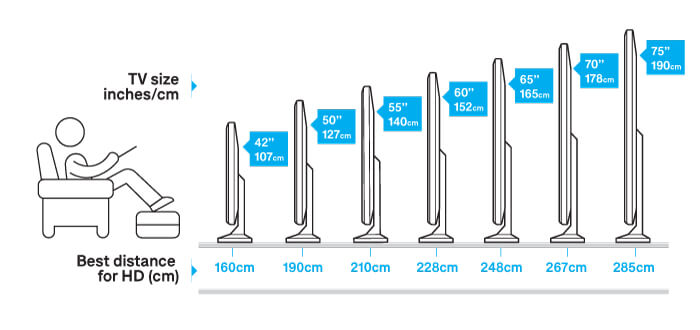
A 127cm (50-inch) HD TV will look fine at a viewing distance of two metres.
If you want to sit closer, get a smaller TV to avoid seeing the pixels (dots) that make up the screen. A bigger TV means you’ll have to sit further away.
Illustrated distance-from-screen guide for HD TV.
Best screen size for a 4K TV
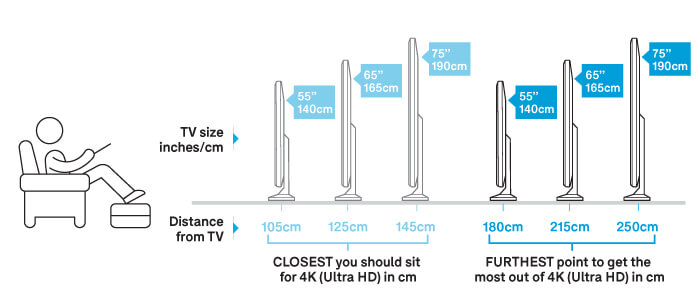
4K TVs have a much higher resolution than HD. This means you can have a large TV in a small room and sit closer to the screen before seeing the individual pixels. Generally, sitting around two metres away from the screen will give you the best viewing experience.
Want a big screen larger than 100 inches? Check out our projector reviews to level up your next movie night.
Illustration of the optimal viewing distance for 4K.
How to get the best picture quality
Here are our tips for judging picture quality when shopping for a TV instore.
Viewing angle
As you move sideways from the centre of the screen, some TVs will lose colour and contrast. If the picture degrades too much when you move away from the centre of the screen, look for another model.
Natural skin tones
Observe textures on a person in a studio setting, such as a news presenter. Watch out for overall colour contamination such as a greenish or yellow tint that can’t be removed by adjusting the controls.
Cycle through picture mode settings
Check outdynamic, standard, normal or vivid in the store, as this may change the picture quality markedly. Remember, most stores have the TVs at their brightest and most saturated colour settings to get your attention. When the TV is delivered it’ll be set to a standard or normal setting and won’t be as bright.
High-dynamic range (HDR)
This technology expands the TV’s colour palette by increasing the level of accessible luminance to display increased contrast between bright and dark colour. Almost all 4K TVs support HDR, and you’ll find plenty of HDR compatible movies and TV shows on disc and via streaming services. The main versions are HDR10, HDR10+ and Dolby Vision.
When you buy your TV, ask the sales person if HDR is on by default, or whether you need to activate it. Some brands require you to turn it on for each HDMI port. Once activated, it should automatically switch on and off when you switch between HDR and non-HDR video content and games.
Getting the best out of dark scenes on a regular TV
While we can’t all go out and buy a 75-inch OLED TV, there are a few things you can do with your TV to see enough detail in shows that have a lot of dark scenes (think Game of Thrones, The Walking Dead, Stranger Things and basically any similar genre series).
Use the TV menu to take your picture settings back to defaults
First, try out some of the TV maker’s suggestions – Cinema, Movie – and see if this does the trick.
Some of the latest TVs also have an ‘HDR effect’ mode where they attempt to enhance the dynamic range of the picture to reveal more detail in dark areas of a scene.
Check on a challenging scene on the show and pause it so you can see the changes in action.
Try Filmmaker Mode (it’s not a gimmick)
Filmmaker Mode is one of the first truly useful picture ‘effects’ introduced in the past few years. It turns off all the post-processing effects introduced by the TV manufacturer, such as motion smoothing, vibrancy enhancements and noise reduction, to deliver a picture as close as possible to the filmmaker’s intentions.
Most new TVs have this as a setting so give it a try, particularly with 4K HDR content. You may never go back to your old colour-saturated setting again.
CHOICE has recently included the Filmmaker score in the CHOICE Expert Rating of our TV reviews as we feel it offers a truly useful picture quality option for your TV and importantly is fairly easy to implement.
Adjust the settings yourself
Play with the Brightness setting and raise the brightness level to see if you can get more detail in the scene without washing out the rest of the picture.
Raise the settings in small increments and keep an eye on the whole scene.
Next, try the Backlight setting, and finally Contrast to help bring out the subject more.
The last resort is to adjust Colour or Colour Temperature settings. You may find this doesn’t help much on especially dark episodes because the colour range available to help bring out the subjects is limited.
You’ll probably need to try a few times to get the picture right. Once you change these settings, you’ll still need to change them back to watch other styles of TV show. Also, make sure you know where the ‘reset picture setting’ selection is located as you may need to start from scratch if you got too adventurous with your colour and brightness settings.
TV speakers have improved over the years, but they rarely sound as good as a soundbar or anything like a home cinema. So if you want to stick with the speakers in your next TV, listen out for these indicators when when you go shopping instore.
Good sound
Good sound should be balanced. You don’t want certain elements of the mix, such as bass, to be too prominent. Keep an ear out for clear dialogue, warm, resonant, full-sounding bass, and clear and punchy details for short and high-frequency sounds like gunshots.
Solid presence, which is the feeling that you’re in the same room as the action you’re seeing on screen, is equally important. This can make the audio feel exciting.
A sense of separation between the left and right speakers will improve immersion along with good dynamics. This is the difference between soft and loud sounds. It helps keep audio frequencies separate so it sounds more exciting and less like a brick wall – footsteps shouldn’t be the same volume as an explosion.
Bad sound
More or less the opposite of good sound, particularly an unbalanced mix. Overly boomy bass can muffle or muddy things up while tinny, hollow, harsh or retrenched sounds leave a feeling that something is missing. It can also lack body or sound like the audio is coming down a phone line. Keep an ear out for hiss and distortion as well.
Brick-walling, where the audio sounds like it’s at the same volume so it seems flat, is another problem that destroys detail and nuance. Particularly loud speakers, especially the bass, can cause case rumble too. It’s distracting and changes the tone of the audio and is also the area we really penalise the TV for in our listening test as it’s not something you can fix in the TV settings.
Retailers love to put on loud, punchy audio because it has an immediate impact that sounds impressive. But loud doesn’t always mean good and after a while, you’ll find that movies and shows sound rather boring due to the flat audio.
Acoustic surface solution
Some TVs, like Sony’s XR65-A80L, claim to improve sound quality and aspects such as presence, with a feature called ‘Acoustic Surface’. Actuators (the mechanism that moves a speaker cone) are placed behind the TV panel and vibrate the panel to produce the sound, so the TV panel becomes a giant speaker.
Therefore you have different areas of the panel handling specific frequencies, while the case sends out additional vibrations to improve ambience, spread and things like the feel of a subwoofer.
Using soundbars or external speakers
Soundbars are a popular option for people that want to get better sound from their TV but don’t have the interest, budget, space or time to build a full-blown home cinema.
They’re designed to simulate the effects of surround sound setups in a much smaller package that’s generally cheaper as well.
But like the move from TVs to soundbars, with few exceptions an external speaker setup and a reasonable amplifier will almost always sound better.
Configurations for both options include:
2.0: stereo surround or left and right channel
2.1: stereo surround plus a subwoofer
3.1: stereo surround plus subwoofer and a centre speaker for enhanced voice
5.1: five speakers and one subwoofer to create the surround sound effect
7.1 or more: adds extra satellite speakers to increase the experience
Dolby Atmos/DTS-X: object-based surround sound which is designed to make you feel like you’re in the location that’s on screen – it can specifically place the objects in reference to their position on screen, which is a step up from the general surround sound in a 5.1 setup.
How soundbars work
Soundbars house a number of speakers in the body that’s designed to replicate various speaker configurations. Replicating left, right and centre speakers is easy as the bar sits under your TV in front of you. However, those that claim to create 5.1 or an Atmos/DTS-X effect do so by angling other speakers towards the walls, so they can bounce audio around the room to ‘surround’ your ears.
Some include an external subwoofer for better low-end. A few brands also sell small rear speakers that you can connect to the soundbar to allow genuine 5.1 surround. Once connected, it will identify the audio type on your Blu-ray, game or video stream and automatically activate the correct configuration, if it’s supported.
How home cinema works
This is the best option for achieving optimal sound, but it can be expensive to do it properly. It can also take up a fair bit of space. A typical setup requires an amplifier and at least two speakers connected to it for stereo surround.
From here, you have the option to buy more speakers and subwoofers for other configurations. Most modern amps support anything up to 7.1, while the latest models can also deliver Atmos and DTS-X with supported content.
Amps can also simulate full surround sound using included software and as little as two speakers. The results aren’t as good as an actual system but they can sound better than most soundbars.
This takes time and some technical knowledge to set up. Home cinema systems often come with automatic room configuration gear, but you really need to tweak the settings to get the most out of them.
How to improve audio and save money
A home cinema can be expensive, but it doesn’t have to break the bank. Technology and codecs (e.g. Dolby and DTS) don’t change all that often, and much of the same tech that was around a decade or more ago is still in use today.
Say you only want to set up a 5.1 surround sound system. In this case you won’t need a high-end Atmos/DTS-X enabled amplifier. A second-hand unit from five or even 10 years ago will work and sound just as good (provided you’re not a hardcore audiophile).
Just bear in mind that you won’t be able to play 4K video through the amplifier unless it’s a recent model. However, you can run one cable into your TV and another into your receiver to split the signal and send 4K video directly to the TV.
Blu-ray/DVD players, media players (e.g. Apple TV) and AV receivers or computers all need to be connected in one way or another. You’ll need to decide the connection type (usually HDMI, an all-digital connection for both sound and video in the one cable) and count the number of connections you’ll need.
New TVs typically only use HDMI. If you want to connect older equipment, you’ll need to buy converters that support classic connectors such as component and S-video (the kind of ports you can find on your VHS player). Converters are available in most electronics stores and online. Simply search for, or ask about, the conversion you require (e.g. component to HDMI converter).
Recording shows and movies
Many TVs will now record shows. However, most TVs will only do it for the program they’re tuned to. Very few TVs have two tuners, allowing you to record one channel while you watch another.
If you think one tuner is going to be enough for you it could help reduce the number of boxes (and remote controls) in your TV room.
Wall mount or table top: Which is best?
Sitting the TV on a table top is easier, but make sure it’s stable and preferably secured to the base, so small children can’t pull it over. Wall mounting looks much neater and can be useful if you’re in a small room that lacks the space for a table top.
However, accessing connections and keeping cords hidden can be a headache if you’re wall mounting. You also tend to sit below the set when it’s wall mounted, which can be an uncomfortable and inferior viewing experience.
Remote control
Make sure the more commonly used buttons (volume, channel selector, standby and mute) can be located at a glance. If you have young children or an absentminded partner and your remote is likely to go missing, choose a TV with easily accessible controls on the TV itself.
Model number
The TV’s model number tells you what year it was made – if you know how to decipher each brand’s product code. Having this information up your sleeve means you can look for the latest model, or drive a hard bargain on an older model.
The refresh rate is the number of times in a second that the screen is refreshed. Supposedly the higher the number (often expressed in Hz), the smoother the image, particularly with sports.
This was once a bit of a marketing gimmick that made movies and TV shows look unnaturally smooth, but things have changed with the latest generation of games consoles. Some games support frame rates of 60–120 frames per second (FPS) which is where a higher refresh rate comes in handy.
Unfortunately, this is not entirely true and manufacturers have taken to making up new ways to measure Hz, which just gives them big numbers to put on the box. Ignore suspiciously high Hz figures and look at the image on the screen.
Freeview and Freeview Plus
Freeview is simply the brand behind free-to-air TV (i.e. ABC, SBS, Network 9, Channel 10 and Channel 7). It integrates the EPG (electronic program guide), or onscreen program guide, which should be easy to navigate and read.
Most TVs also support Freeview Plus. This adds support for catch-up TV apps like iView and 7plus, so you watch what you want when you want. However, for all this to work you need your smart TV connected to the internet through your home network, as the catch-up TV is delivered to you via streaming video.
Australia’s best TV brand
So which TV brand should you buy? We’ve identified the best of the bunch based on our test results as well as feedback from our members on satisfaction and reliability. With almost 50 years of testing experience behind us, we can confidently tell you about video and audio performance, as well as ease of use. We normally test about 80 TV models each year in our labs, covering a majority of the market.
Best TV brand for 2025: LG
LG is once again the best TV brand for the past 12 months. LG TVs have performed well in our labs over this period, and LG TV owners are very satisfied according to our product reliability survey.
This is the tenth year running that LG has scored the CHOICE Best Brand title for TVs. To find out which specific TV models we recommend, click on the ‘Recommended’ box in the filters section of our TV reviews.
TV Best Brand scores for 2025
LG – 83%
Sony – 79%
Samsung – 76%
Hisense – 72%
TCL – 70%
Kogan – 67% (only two models tested)
Bauhn (Aldi) – 66%
Hisense, TCL, Kogan and Aldi are not eligible for Best Brand this year as they don’t meet all our criteria.
It’s important to note that the performance of specific product models may vary quite significantly, so don’t assume that one brand’s products are the best across the many different features, functions and price points.
What are CHOICE Best Brand recommendations?
The Best Brand recommendation for TVs is based on our test results for TVs tested from 2020 through to 2025, as well as customer satisfaction and reliability information submitted by CHOICE members about their experience with the brand.
The recommendation is given to companies with a clear lead over their competitors during the test period, and no more than two recommendations are given during each period.
Best Brand eligibility is tough – to be considered, we must have tested a minimum of five models, and a brand must have received a minimum of 50 responses to the CHOICE member survey. Additionally, brands must score a minimum of 60% and be above the average score for average test score, reliability and satisfaction for consideration.
How we calculate the best TV brand
The following criteria determines the Best Brand recommendation.
Average test score – 40%
Brand reliability – 30%
Customer satisfaction – 20%
Recommended ratio – 10%
Average test score
This is an average of the CHOICE Expert Rating (our overall score) for all the brand’s models that we tested.
The CHOICE Expert Rating covers:
picture quality – standard and high definition, with a viewing panel looking at DVD, Blu-ray, 4K and live TV footage
ease of use – including any smart TV features and remote control menu navigation
sound quality
energy testing – we measure standby and in-use energy consumption to deliver an annual cost to consumers.
Our CHOICE customer insights team surveyed over 2300 people about whether they’ve run into any problems with their TV in the past 12 months.
Customer satisfaction
Our survey also asks how satisfied members are with their TV. So even if a TV has a fault after six months, it’s still possible for it to have a high satisfaction score – perhaps the company has customer service that goes beyond expectations, or the product is simply too good, despite some performance quirks.
Recommended ratio
We calculate the percentage of TVs that we recommend for each brand. The greater the number of models that earn a recommendation, the higher the recommended ratio score.
Once you’re ready to upgrade your TV, what do you do with the old one? Don’t send it off to landfill just yet because there’s a good chance it can be reused or recycled.
Donate it
Some charities will take working LCD and LED TVs. When it comes to the major ones, Salvos will accept them, Vinnies might depending on the store, and The Red Cross won’t. You can also try contacting smaller local charities or community organisations in your area. They may even come and collect your old TV if you’re not too far from their storage facility.
This is a government-run, industry-funded program that recycles a bunch of e-waste items, including old TVs. It has a number of dedicated drop-off points including spaces shared with local businesses, like Officeworks. To find your nearest location, head to TechCollect or Recycling Near You and enter your address. Just remember to call the location before heading down there as some smaller locations may not have the space to store old TVs.
Otherwise, most local councils will accept TVs during e-waste drop-off events at no charge. These are a little different to your regular council clean-up as you’ll need to take the TV to a collection facility rather than putting it out on the kerb.
For example, the NSW Inner West council (where CHOICE is located) accepts TVs. Check your local council website or give them a call to find out if TVs can be dropped off in your area.
You can also consider using The Good Guys’ and JB Hi-Fi’s recycling services, which operate through Ecoactiv. The staff will accept almost any item with a power cable that you can think of. They’ll come and collect it for free and they’ve also committed to donating five meals to people in need for every item recycled. Just head to the Ecoactiv website, submit the items you want to recycle and someone will get in touch.
Denis Gallagher is a Senior project officer for Digital home products and also works on test projects for the laundry and fridge labs. He produces tests for gadgets, phones, cameras and home entertainment gear as well as TVs, washing machines, dishwashers and fridges.
Previously at CHOICE, Denis worked as a Content producer for digital products. Prior to CHOICE, Denis worked as an Assistant editor on Golf Australia magazine and Editor for Multimedia and Videocamera magazine.
Denis has a Bachelor of Arts from the University of New South Wales and a Diploma of Journalism from Macleay College.
Denis Gallagher is a Senior project officer for Digital home products and also works on test projects for the laundry and fridge labs. He produces tests for gadgets, phones, cameras and home entertainment gear as well as TVs, washing machines, dishwashers and fridges.
Previously at CHOICE, Denis worked as a Content producer for digital products. Prior to CHOICE, Denis worked as an Assistant editor on Golf Australia magazine and Editor for Multimedia and Videocamera magazine.
Denis has a Bachelor of Arts from the University of New South Wales and a Diploma of Journalism from Macleay College.
For more than 60 years, CHOICE has been fighting the good fight for Australian consumers.
In the past year alone we've uncovered systemic issues with sunscreens, investigated shonky supermarket pricing, fought for stronger scam protections and helped make complex energy pricing fairer and clearer.
CHOICE is here to provide unbiased advice and independent testing in our world-class labs. We buy the products we test, just like you do, and our expert reviews are influence free. We’re here to help you choose smarter. Hopefully you’ll also save some money along the way.
Thanks to CHOICE, you’ll never be alone when a business treats you unfairly. You can support our work by joining or donating to our cause.