Wi-Fi is so much more than internet in the air. Did you know older modems and routers might not be capable of tapping into your internet plan’s best possible speeds? In fact, ageing equipment may be the reason why your new, fancy high-speed plan is feeling a bit slow on Wi-Fi.
The Wi-Fi standard (basically the firmware that makes Wi-Fi work) is updated every few years. The updates broadly improve performance and security which means faster speeds at home for the average user.
Ageing equipment may be the reason why your new, fancy high-speed plan is feeling a bit slow on Wi-Fi
Your router or modem-router needs to support one of the latest versions to access the best speeds delivered by the NBN. These are Wi-Fi 6, 6E and 7. Networking equipment that’s running older versions will work, but it may create a bandwidth bottleneck and you could be paying for a plan that you can’t actually use.
That’s why a Wi-Fi 6, 6E or 7 router is the way to go. But it’s worth noting that each version is different and the best option depends on your NBN plan, download/upload needs and the number of people in your home.
If you’re not across how modems, routers and modem-routers connect your home to the NBN (and other internet options), check out our modems and routers guide. Note that references to routers also cover modem-routers even though most homes don’t need these to connect to the NBN.
Like your computer, smartphone and TV, your Wi-Fi needs firmware to function. A group of organisations quietly maintain and update this firmware to match improvements in networking hardware (router, mesh networks etc) and internet speeds.
The latest version is Wi-Fi 7 (released in 2024), so called because it’s the seventh generation of the Wi-Fi standard. This succeeds Wi-Fi 5 (2013), Wi-Fi 6 (2019) and Wi-Fi 6E (2021).
These Wi-F- versions are bound to the hardware, so you can’t upgrade your router to a newer Wi-Fi version at home. If you want the benefits of a newer version, you have to buy new equipment.
Wi-Fi 6 and 7 key terms glossary
Modem: Bridges the connection between the outside internet line and your home via a wall socket (like a landline). The NBN connection box (NTD) also functions as a modem.
Router: Distributes the internet throughout your home via wired (ethernet) or wireless (Wi-Fi) signals.
NBN Co: The organisation responsible for managing National Broadband Network wholesale connection packages and infrastructure across Australia.
Internet service provider (ISP): Companies that sell NBN packages – aka plans – to consumers. These are available in a variety of speeds to match your home internet needs and budget. Your ISP is the point of contact for all things NBN at home.
Band: Frequencies used to distribute a Wi-Fi signal, measured in gigahertz (GHz). Lower bands have slower speeds but greater range. Speeds increase and range reduces as bands increase. The bands in home Wi-Fi equipment are 2.4, 5 and 6GHz. Dual-band routers can connect to 2.4 and 5GHz while tri-band can also access 6GHz for maximum performance.
Upload/download speed: How quickly you can download and upload files (which also affects video streaming quality). These are often displayed together in ISP plans i.e. 500/100 (500Mbps download/100Mbps upload).
Bandwidth: Maximum data transfer rate. Affects the number of devices that can be connected and in use at the same time without issues like buffering, lag and drop-outs.
How Wi-Fi versions affect speed and performance
Routers can only send and receive a certain amount of data at a time. This data is measured in megabits per second (Mbps) or gigabits per second (Gbps) once the total number of megabits exceeds 1000 (1Gbps = 1000 Mbps).
Your router’s Wi-Fi version is one of the key factors that determines data transfer speeds. The peak speeds supported by older versions is much lower than the speeds supported by Wi-Fi 6, 6E and 7, which means that older versions can experience a performance bottleneck.
Say you’re signed up to an NBN plan with 500Mbps download speeds (e.g. 500/100) that connects to your home using a Wi-Fi 4 router. Wi-Fi 4 has a maximum speed of 100Mbps so even though your plan can reach up to 500Mbps, your home network is limited to one fifth of that. See the problem?
That’s why you need a router with a Wi-Fi version that matches or exceeds your NBN plan’s maximum speeds. This is particularly important after the NBN’s recent free speed upgrades – your older router may have worked just fine when you were on a 100/40 plan, but the 500/100 speed boost could exceed its capabilities.
Typicalmaximum Wi-Fi speeds for recent Wi-Fi versions
Wi-Fi 7 (802.11be): up to 2000 megabits per second.
Wi-Fi 6 (802.11ax): up to 1000 megabits per second.
Wi-Fi 5 (802.11ac): up to 500 megabits per second.
Wi-Fi 4 has a typical peak speed of up to 100 Mbps. Speed tiers refer to maximum typical speeds across three NBN plans sold by ISPs. Figures in brackets refer to the technical Wi-Fi version name as per the Institute of Electrical and Electronics Engineers (IEEE) standard. This may appear in your router information in place of the general name.
How Wi-Fi versions affect bandwidth
The data transfer rate also affects bandwidth, which is just as important as speed. Bandwidth basically determines how many devices can access the network at the same time without causing lag, buffering and other general performance problems.
For example, if you have four people streaming 4K video on your 1000/100Mbps plan at the same time, they can access up to 250Mbps worth of data each. This is more than enough bandwidth to supply the speeds required for video streaming.
This is where a Wi-Fi 6, 6E or 7 router comes in handy. Older Wi-Fi versions may not have enough bandwidth to go around, such as Wi-Fi 4 which caps at 100Mbps leaving each person with 25Mbps for streaming.
Wi-Fi 7 also improves and reduces latency between devices, which is a fancy way of saying there’s less lag. You probably won’t notice much difference doing day-to-day activities, but less latency is a big tick for anyone who plays fast-paced games online.
Text-only accessible version
Speed vs bandwidth 500Mbps example
500Mbps NBN connecting to a single device in a home can deliver a maximum download speed of 500Mbps for that device.
500Mbps NBN connecting to four devices in a home can deliver a maximum download speed of 125Mbps per device.
This is a technical example that doesn’t factor in the range of devices and their networking capabilities, typical evening speeds, content being consumed on each device etc. Actual performance will vary.
How to check the Wi-Fi version at home
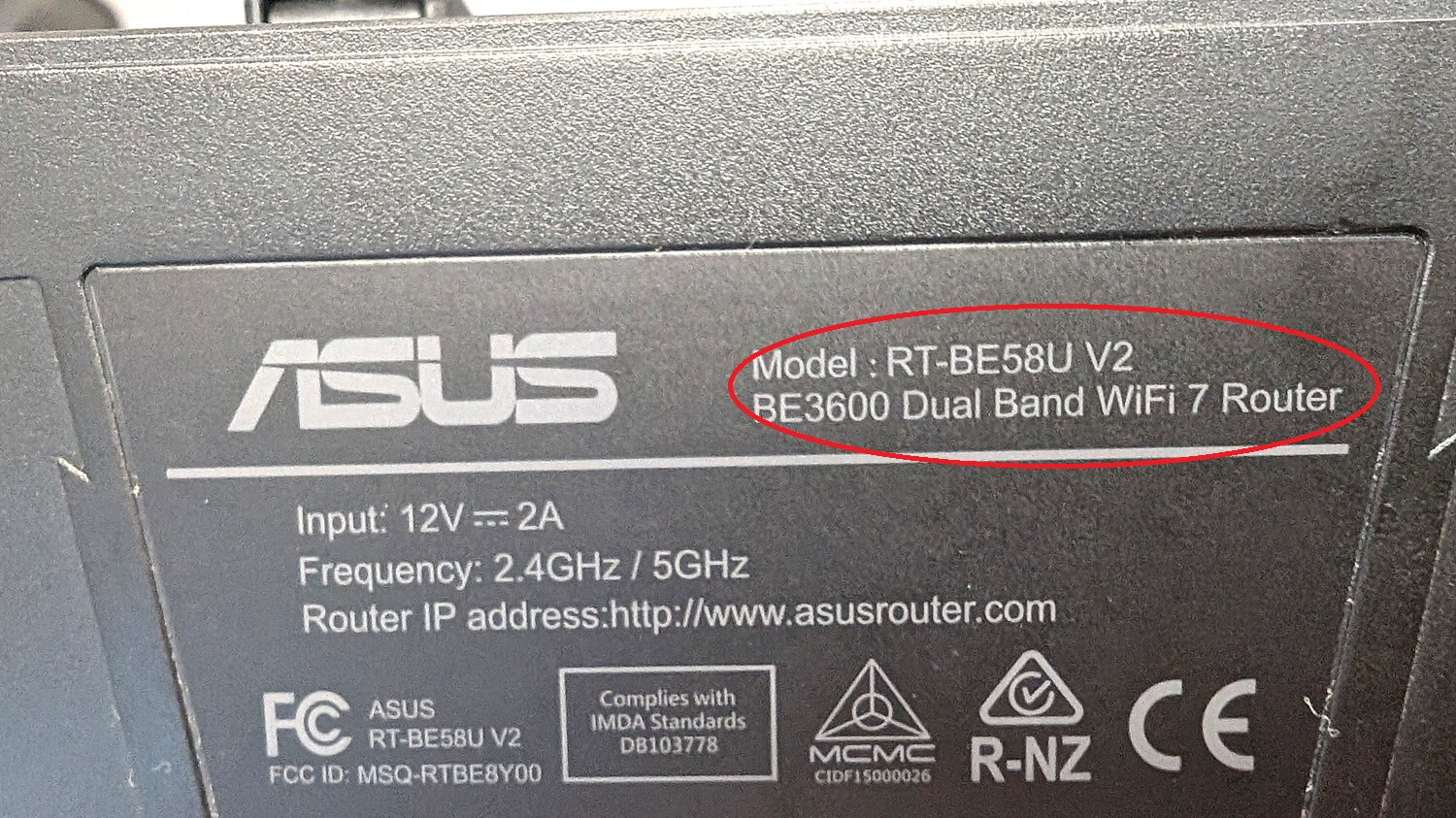
An upgrade may be required if you’re running anything older than Wi-Fi 5. The first thing to do is check the Wi-Fi version on your router by flipping it over and looking through the information printed on the base, checking the manual or searching the model number online.
Note that your router may list the technical name for the Wi-Fi version instead of the consumer alternative. These are:
Wi-Fi 7: 802.11be
Wi-Fi 6/6E: 802.11.ax
Wi-Fi 5: 802.11ac
Wi-Fi 4: 802.11n
We haven’t included Wi-Fi 1 to 3 due to their age and performance limitations in 2026.
You can probably get away with holding onto a Wi-Fi 5 router for now, as this version is capable of running NBN plans with a maximum download speed of 500Mbps. Wi-Fi 4 will not typically exceed 100Mbps and though there are plans at (and below) this speed, using older equipment is risky.
Wi-Fi 6E is an ‘extended’ version of Wi-Fi 6. It adds a 6GHz band for supported routers which can help relieve network congestion when lots of devices are online at the same time. It can also exceed the 1000Mbps Wi-Fi 6 limit with a bit of technical knowhow.
Many routers print the Wi-Fi version on the base.
Security concerns
Routers running Wi-Fi 5 (and earlier) are getting very long in the tooth and may have reached end of life. That means manufacturers may have stopped rolling out essential security updates which leaves your network extremely vulnerable to attack.
After all, Wi-Fi 5 is almost 13 years old while Wi-Fi 4 is about to turn 17. Smartphone and laptop operating systems aren’t supported for that long and your router probably isn’t either.
This mostly comes down to the maximum download speeds on your NBN plan. Wi-Fi 6 and 7 routers support the fastest NBN plans currently available to consumers and they futureproof your network for potential speed upgrades down the line.
A Wi-Fi 7-enabled router is the best option as these typically deliver speeds around 2000Mbps. Wi-Fi 6 caps out at 1000Mbps, but this is still suitable for the vast majority of consumers signed up to plans that deliver 1000Mbps or less.
The advertised Wi-Fi version is the best indicator of how your modem-router or router will perform on the NBN. Ignore the maximum bandwidth and download speeds being advertised by Internet Service Providers. They’re not inaccurate, but they’re a bit misleading.
On paper, Wi-Fi 6, 6E and 7 can achieve maximum speeds that go well beyond consumer-grade NBN plans. You think 1000Mbps download is fast? Try 9.6Gbps on Wi-Fi 6! Manufacturers love to advertise these figures and you’d be forgiven for thinking that a Wi-Fi 6 router can reach Wi-Fi 7 speeds.
So why can’t Wi-Fi 6 routers hit anything faster than 1000Mbps? Hardware, particularly the Wide Area Network (WAN) port. The WAN is a part of the chain that connects your home network to the outside line and it has a data limit as well, just like Wi-Fi versions.
Back when Wi-Fi 6 was the norm, pretty much every consumer-grade router and modem-router used a 1Gbps (1000Mbps) WAN port, creating a bottleneck. WAN hardware has since improved which is why Wi-Fi 6E and 7 routers can reach greater maximum speeds.
Text-only accessible version
Wi-Fi bottleneck 500/50MBps example
Wi-Fi 4 router: 500/50Mbps plan is delivered via a Wi-Fi 4 router with a maximum bandwidth of 100Mbps, reducing your maximum download speed to 500Mbps.
Wi-Fi 7 router: 500/50Mbps plan is delivered via a Wi-Fi 7 router with a maximum bandwidth of 2000Mbps, maintain your maximum download speed of 500Mbps.
This is a technical example that doesn’t factor in Wi-Fi compatibility of the supported device.
The last piece in the networking puzzle is device computability. Will your phone, laptop, TV, games console, smart lightbulbs, doorbell, baby monitor and everything else work with Wi-Fi 7?
Yes, with a caveat. In order for Wi-Fi 7 to reach its full potential, your devices will need to be able to support the maximum speeds as well. But Wi-Fi 7 is still fairly new and many older laptops, phones, tablets and so on won’t support it.
Your devices will still connect because Wi-Fi 7 is backwards compatible with older versions. You just won’t get the same blistering speeds as you would with a compatible device.
There’s no need to worry about buying into a technology that isn’t widely supported just yet. It’s only a matter of time before Wi-Fi 7 replaces Wi-Fi 6 as the new normal for devices.
Why we've partnered with WhistleOut

We've partnered with search engine WhistleOut to help you find and buy the right plan for you.  While we make money if you buy through WhistleOut, this doesn't influence our rankings. 100% of the money we make goes straight back into our nonprofit mission.
Peter Zaluzny is a Content producer in the Digital home team. He covers everything from home entertainment and personal safety devices to tech for your car and mattresses.
Peter enjoys cutting through the nonsense to help people understand the products they’re considering to buy. He helps consumers make educated, informed decisions.
Peter has a Bachelor's degree in Journalism and a Bachelor of Arts from the University of Wollongong.
Peter Zaluzny is a Content producer in the Digital home team. He covers everything from home entertainment and personal safety devices to tech for your car and mattresses.
Peter enjoys cutting through the nonsense to help people understand the products they’re considering to buy. He helps consumers make educated, informed decisions.
Peter has a Bachelor's degree in Journalism and a Bachelor of Arts from the University of Wollongong.
For more than 60 years, CHOICE has been fighting the good fight for Australian consumers.
In the past year alone we've uncovered systemic issues with sunscreens, investigated shonky supermarket pricing, fought for stronger scam protections and helped make complex energy pricing fairer and clearer.
CHOICE is here to provide unbiased advice and independent testing in our world-class labs. We buy the products we test, just like you do, and our expert reviews are influence free. We’re here to help you choose smarter. Hopefully you’ll also save some money along the way.
Thanks to CHOICE, you’ll never be alone when a business treats you unfairly. You can support our work by joining or donating to our cause.