There’s more to your printer than the recommended retail price. Ink or toner will be an ongoing expense, potentially costing hundreds of dollars every year, depending on the brand and model.
But there are ways to help reduce ink’s impact on your income. Some are as simple as using eco mode or printing fewer full-colour documents. Others are a little more expensive at first but will save lots of money in the long run.
This is how our printer experts save money on printer ink.
Note: most of these tips apply to inkjet printers, but some can help cut down on toner consumption for laser models.
1. Avoid printers that use a single cartridge for colour inks
Typical inkjet colour printers need four core colours to print properly – cyan, magenta, yellow and key (a technical term for black). You may have seen this in advertising or the product specifications in abbreviated form; C, M, Y, K.
C, M and Y are used as the basis for colour printing. The printer automatically distributes and blends a certain amount of each to create different colours on the page.
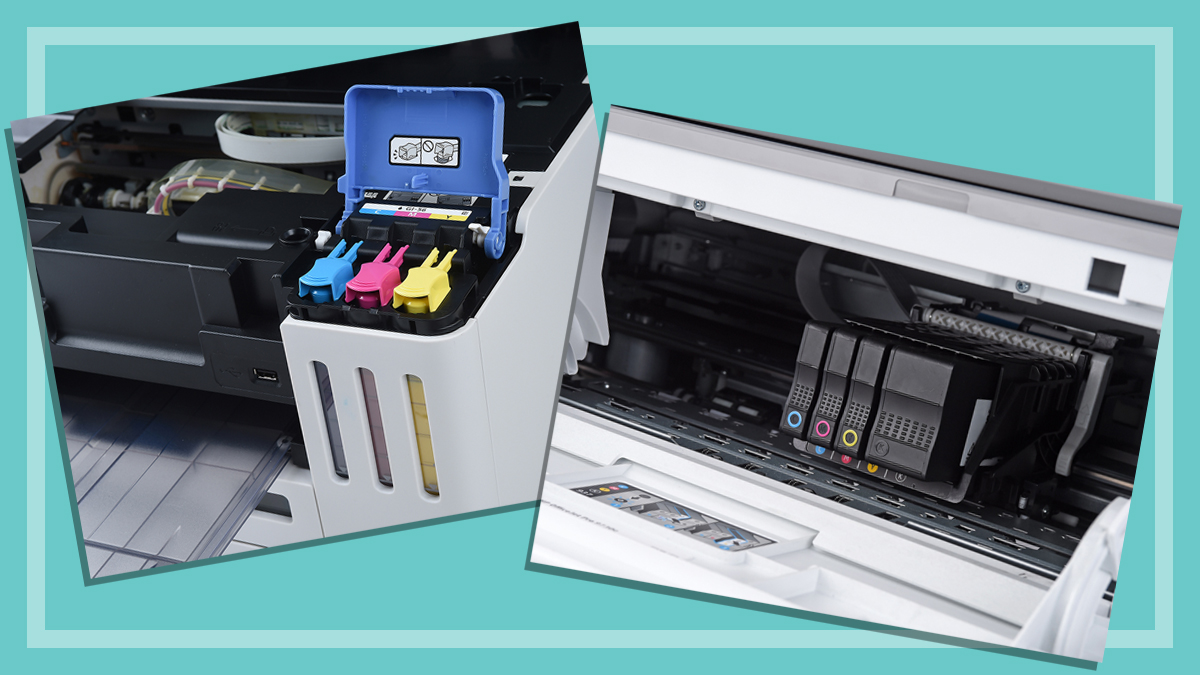
Most consumer-grade inkjet printers use ink cartridges. Some store cyan, magenta and yellow in a single cartridge, while others use separate cartridges for each core colour. Key (black) is typically kept in a separate cartridge.
Printers that store C, M and Y in a single cartridge are best avoided as they can end up being very wasteful and expensive. This is because they need to be replaced when one colour runs dry, regardless of how much ink is left in the other tanks. You can’t replace or refill a single core colour in these printers. In other words, you’ll be throwing away perfectly good ink.
These aren’t the only option though, there are plenty of printers that store coloured inks in individual cartridges instead. These are a better alternative as you can replace colours as they run dry. But the cartridges can still be pretty expensive.
2. Consider a CISS printer
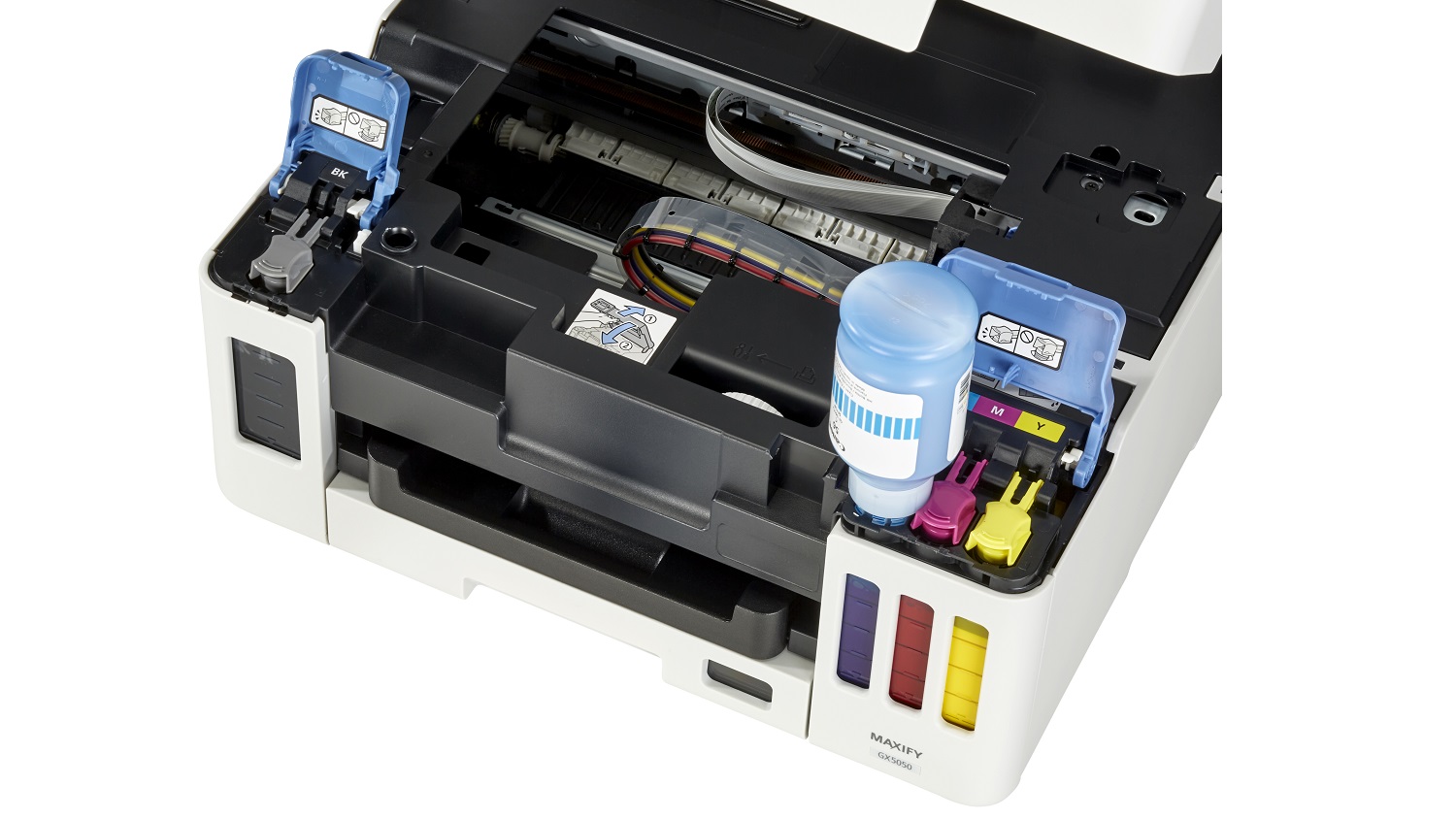
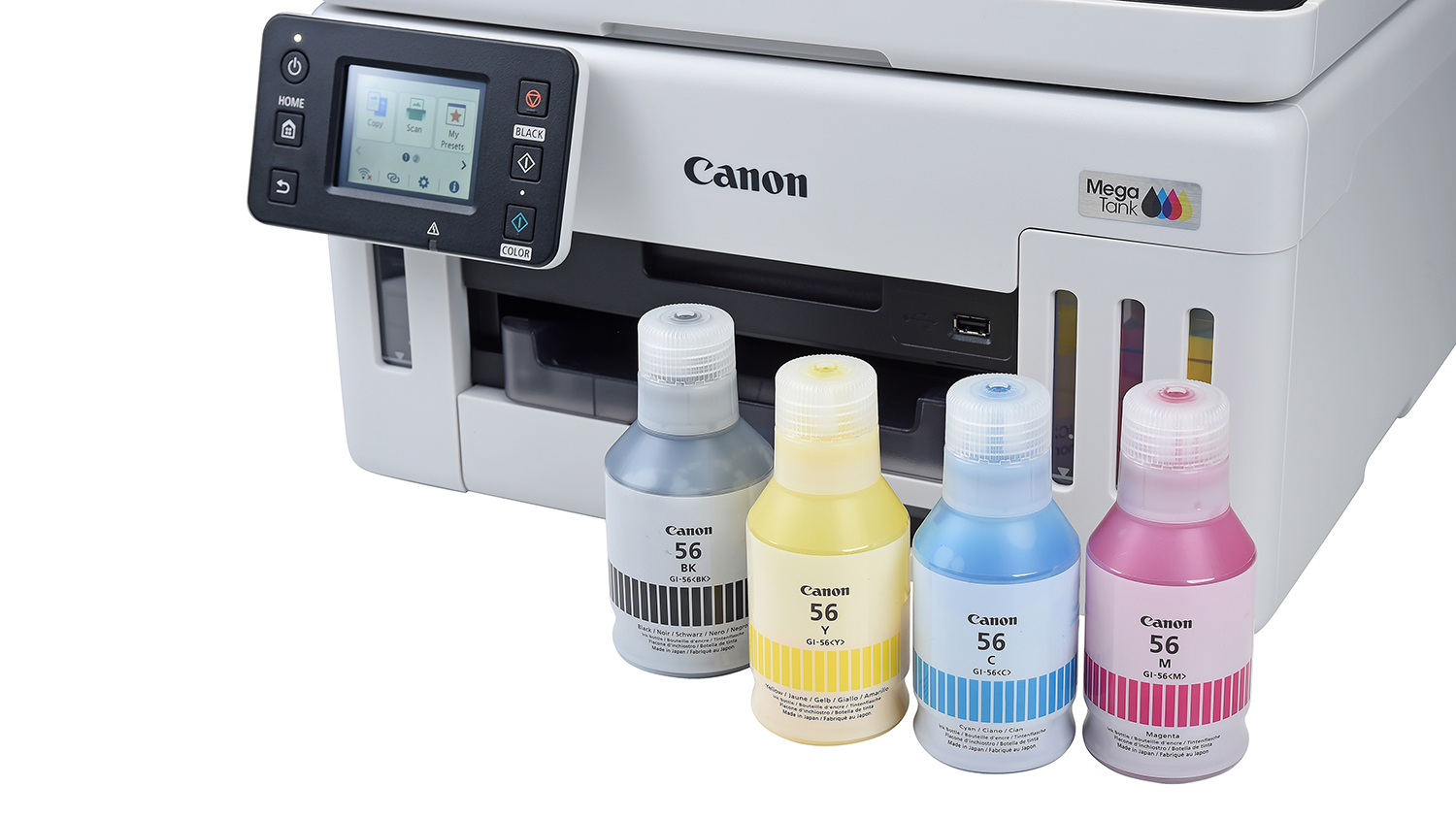
Continuous ink supply system (CISS) printers don’t use cartridges at all. Instead, the C, M, Y and K inks are stored in reservoirs which you can refill as they run out.
This is much cheaper than both types of cartridge printers for two reasons. Firstly, you’re not wasting ink when one colour runs out. And secondly, manufacturers supply the refillable inks in small bottles, which are usually cheaper than individual colour cartridges.
Not only does this deliver more bang for your buck, it’s much better for the environment. CISS printer reservoirs are usually bigger than standard cartridges too and don’t need to be refilled as often.
CISS printers use individual ink tanks that you can refill as needed.
The savings speak for themselves. The CISS printers in our test cost less than 1 cent to print a monochrome text page and 3–5c for full colour graphics. Meanwhile, cartridge-based inkjet printers cost around 5c for text and around 20–55c for colour graphics.
So, what’s the catch? Most CISS printers have a much higher upfront cost – you’re not going to find many in the budget section. But you can recoup these expenses pretty quickly.
For example, a $539 Epson CISS printer in our test uses around $25 worth of ink each year. By comparison, one of the least efficient HP prints costs a mere $59 but guzzles a whopping $565 in ink per annum. So if you’re printing regularly, you’ll be better off after just one year if you pay more up front for the CISS model.
3. Don’t buy a cheap printer
Our experts have found that the cheapest printers are almost always an inky insult to your savings goals. The worst offenders can use up to ten times their asking price in ink over the course of a year!
That’s not to say that expensive printers always perform better. It’s just that excessive ink consumption tends to show up more in the cheapest models.
Avoid these low-price printers like the plague. Aim for a starting price of $300 and if that’s outside your budget, wait for a sale or head in store and haggle. There’s a lot of wiggle room in the price of printers and they often enjoy decent markdowns.
Most printers have “eco”, “draft” or lower quality printing options that reduce the ink output. Though images and text may look faded, they should still be easy to read, so you can save full-quality printing for important documents.
Some programs may let you make these adjustments in the printing options window. But it’s often easier to adjust them in the printer settings as per the instruction manual.
5. Limit colour printing
Does your PDF ticket to the local agricultural show really need to be in full colour? Are you sure that assignment requires a rainbow’s range of headings?
Colour is only really necessary if you’re printing images/charts, highlighting sections of text or preparing nice documents like newsletters or party invitations. Otherwise, it’s best to stick with cheaper black and white ink.
When the printing options window appears, make sure the colour selection is set to black and white (sometimes called monochrome or b/w). The exact location depends on the software. But it will usually be spelled as a button or in one of the dropdown menu settings.
Low ink or toner alerts can be a little premature on most printers. You don’t need to replace the cartridge or refill the ink reservoirs as soon as the prompt appears.
Look for indicators on the printed pages instead. If colours start to look a little off or text is pretty faded, it’s time to swap the cartridges or barrels, or refill the inks.
7. Avoid running manual cleaning cycles
Almost all inkjet printers automatically clean the ink nozzles (aka heads), to prevent clogs. Most run a quick flush during start up and more thorough cycles on a schedule.
How do they clean? By flushing ink through the system. The amount varies depending on the printer, with some models using quite large volumes, which can really bump up your annual ink expenses.
There’s no need to run a manual cleaning cycle unless you get a prompt from the printer or your documents don’t look right. Otherwise, you’re just wasting precious ink.
Try to regularly use your printer so the ink heads don’t dry out and clog up.
8. Only buy ink that you’re going to use
It’s tempting to stock up on expensive ink during a sale. But it’s a liquid and liquids eventually dry out.
Only buy what you need, otherwise you’ll end up with a box of powder paints that are no use to your printer. The expiration window varies so look for this information on the packaging.
If you do stock up, or you don’t use a whole bottle of ink for a CISS printer, store the excess cartridges in a sealed tub or zip locked bag. This can extend the lifespan but it won’t completely protect it from drying out over time.
9. Invest in an economical printer
Check out our test results to find a printer that finds the best balance between annual ink consumption and an asking price that fits your budget. We also record how much ink is used during a cleaning cycle as this is an often overlooked expense.
This information is available in our comparison table, exclusively for CHOICE members.
Sounds almost counterintuitive, no? But idle inks are the devil’s pages.
When a printer is turned off and unused for months at a time, the ink heads can dry out and clog the system. A deep clean cycle can be difficult and a costly waste of ink. You may even end up damaging the printer beyond repair.
You don’t need to needlessly print things all the time. But if it’s been a few weeks, print a page or two to help keep the ink heads flowing.
Are refillable or generic cartridges still worthwhile?
Third-party and refillable cartridges have been the affordable ink alternatives for some time. They’re still around and cheaper than name-brand options, but may not be worth the effort these days.
Far fewer printers support third-party cartridges than they used to. HP, for example, quite famously rolled out firmware updates for a number of its printers in 2022, which retroactively blocked third-party cartridges as part of its “dynamic security measures”.
Meanwhile, though refillable cartridges are still available, the process is just as fiddly, messy and time-consuming as ever. CISS systems, however, are pretty straightforward and don’t have the same risks as generic alternatives.
Refillable CISS systems are more reliable and less fiddly than third-party cartridges.
The jury is still out on whether a generic cartridge will damage your printer. During our past tests on ink cartridges none of the inkjet printers appeared to suffer head damage. But leaks can happen and these may be the death knell of an inkjet printer – one that won’t be covered by warranty.
If you need the highest possible print quality, you probably should stick with the branded ink cartridges as they tend to perform a bit better. Generic cartridges may lead to fading and colour accuracy issues, though typical text documents should look fine.
How to recycle printer cartridges
Did you know as much as 97% of all printer cartridges are recyclable? And it’s not that hard to recycle your cartridges, toner barrels, empty CISS ink bottles and more, especially if you live in a city or larger regional centre.
All you need to do is take your printer bits to a drop off spot. You’ve probably seen the deposit boxes in post offices or at Officeworks and at The Good Guys stores, but other retailers like Harvey Norman, JB Hi-Fi, small businesses and community groups may also accept cartridges for recycling.
Go to recyclingnearyou.com.au/cartridges and enter your postcode to find your nearest drop-off point. Alternatively, contact your local council, or check their website, for recycling options in your area.
Peter Zaluzny is a Content producer in the Digital home team. He covers everything from home entertainment and personal safety devices to tech for your car and mattresses.
Peter enjoys cutting through the nonsense to help people understand the products they’re considering to buy. He helps consumers make educated, informed decisions.
Peter has a Bachelor's degree in Journalism and a Bachelor of Arts from the University of Wollongong.
Peter Zaluzny is a Content producer in the Digital home team. He covers everything from home entertainment and personal safety devices to tech for your car and mattresses.
Peter enjoys cutting through the nonsense to help people understand the products they’re considering to buy. He helps consumers make educated, informed decisions.
Peter has a Bachelor's degree in Journalism and a Bachelor of Arts from the University of Wollongong.
For more than 60 years, CHOICE has been fighting the good fight for Australian consumers.
In the past year alone we've uncovered systemic issues with sunscreens, investigated shonky supermarket pricing, fought for stronger scam protections and helped make complex energy pricing fairer and clearer.
CHOICE is here to provide unbiased advice and independent testing in our world-class labs. We buy the products we test, just like you do, and our expert reviews are influence free. We’re here to help you choose smarter. Hopefully you’ll also save some money along the way.
Thanks to CHOICE, you’ll never be alone when a business treats you unfairly. You can support our work by joining or donating to our cause.